Three great free games. One whole audience ready to join in. Guests play from their phones while the main screen brings the event to life with TV-style coverage, questions, scores and results. Download the games through Future Karaoke Hub and turn your next gathering into a proper games night.
BETA · WINDOWS
Hub for Windows
Open the Hub to launch Future Karaoke and discover three free games. Try the beta and tell us what you think.
Download and run the installer, then open Future Karaoke Hub from your Start menu. To try the games, enable Include beta games in the Hub.
Installs for your Windows account. Updating or uninstalling the Hub keeps your games and saved settings.
The Hub asks before sharing basic usage: opens, game installs and app launches. You can switch sharing off at any time.
This beta installer is unsigned, so Windows may show a SmartScreen warning.
Open the Hub to launch Future Karaoke and discover the three free games. Enable Include beta games in the Hub to try the games.
Download and unzip, then move Future Karaoke Hub into your Applications folder and open it from there. Install Future Karaoke separately using the Mac download above.
For Apple Silicon Macs (M1 or later) running macOS 12 or later. This beta does not support Intel Macs.
Sharing basic usage is optional, and you can change your choice in the Hub.
Developer ID signed and Apple notarised. Hub updates download in the background and install when you quit; your games and saved settings are kept.
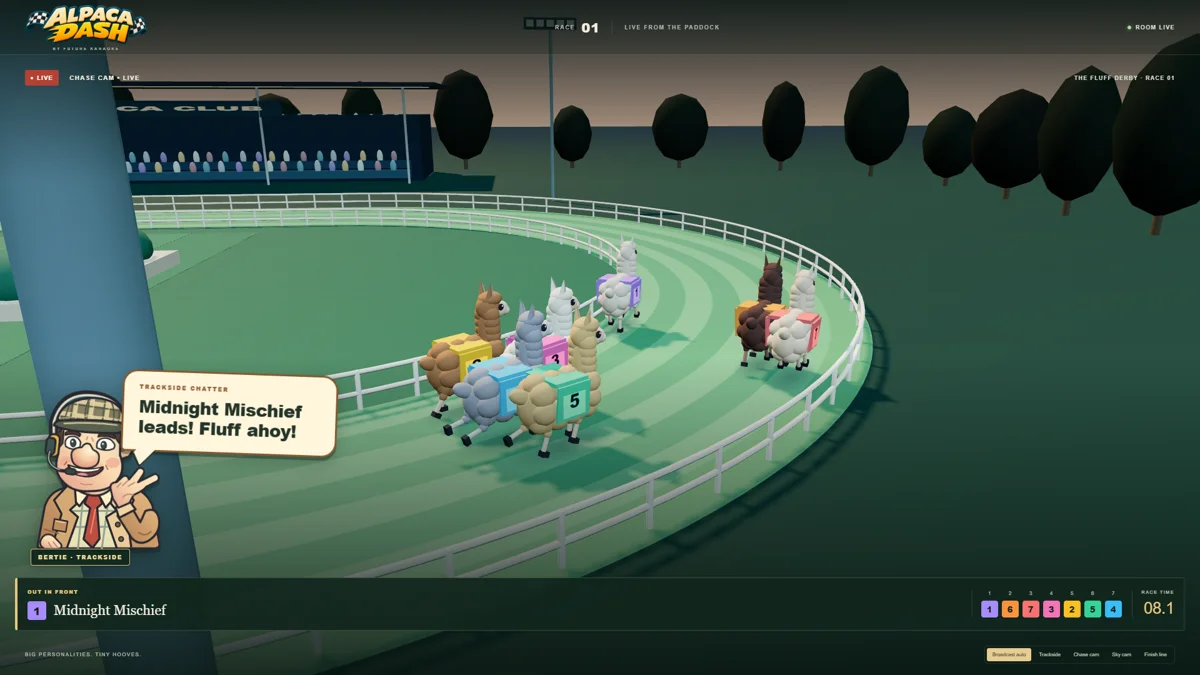
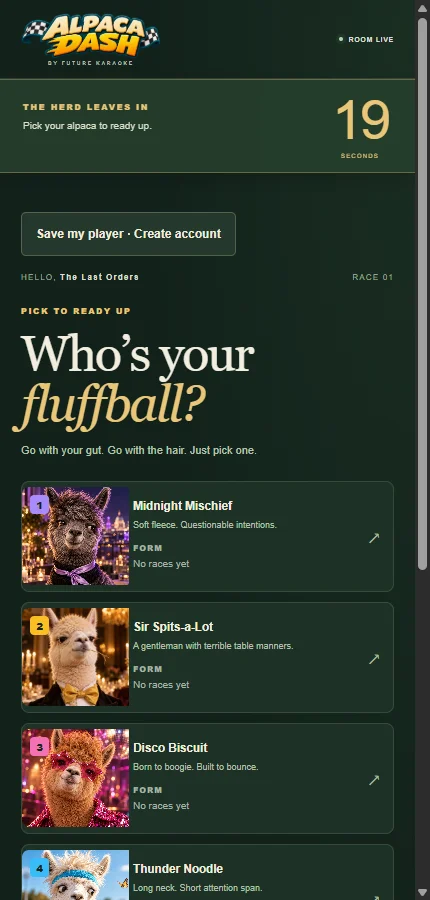
A race night with a wonderfully woolly twist. A fun alternative to horse racing, with colourful alpacas, lively courses and a big-screen race broadcast. Everyone can join from their phone, pick an alpaca and follow the dash to the finish together. Expect plenty of cheering as the room discovers whose favourite has the legs to win.
The action on your main screen.Pick your alpaca on your phone.
Free game · Audience participation
Quiz Player
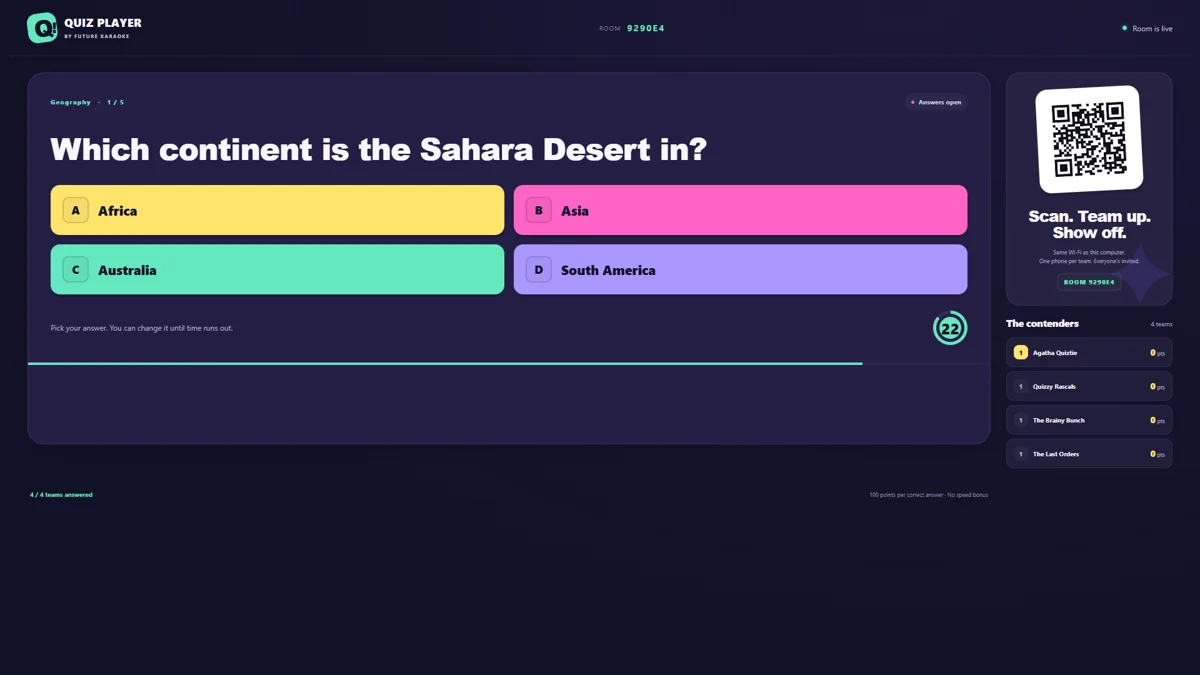
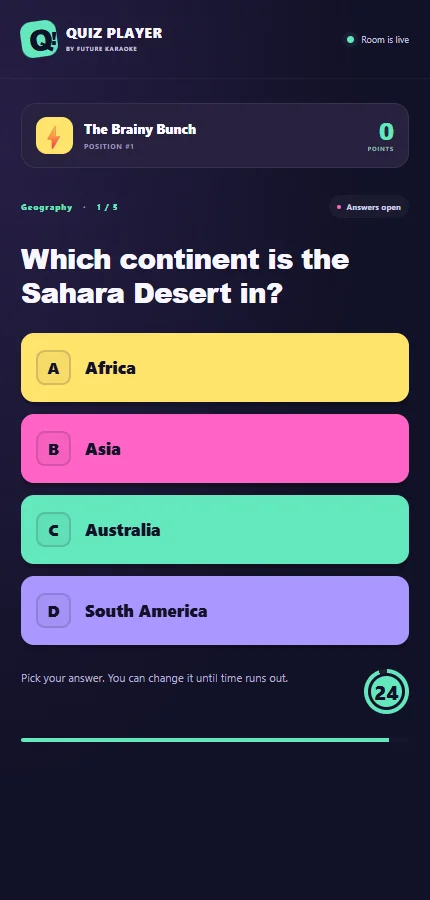
A whole evening of “I know this one!” Get the whole audience thinking, guessing and celebrating together. Quiz Player can host audience quizzes lasting over an hour, with guests answering from their phones while questions, answer reveals and scores take over the main screen. Play as teams and keep the friendly rivalry going from the first question to the final results.
The action on your main screen.Answer the quiz from your phone.
Free game · Audience participation
Flick Football
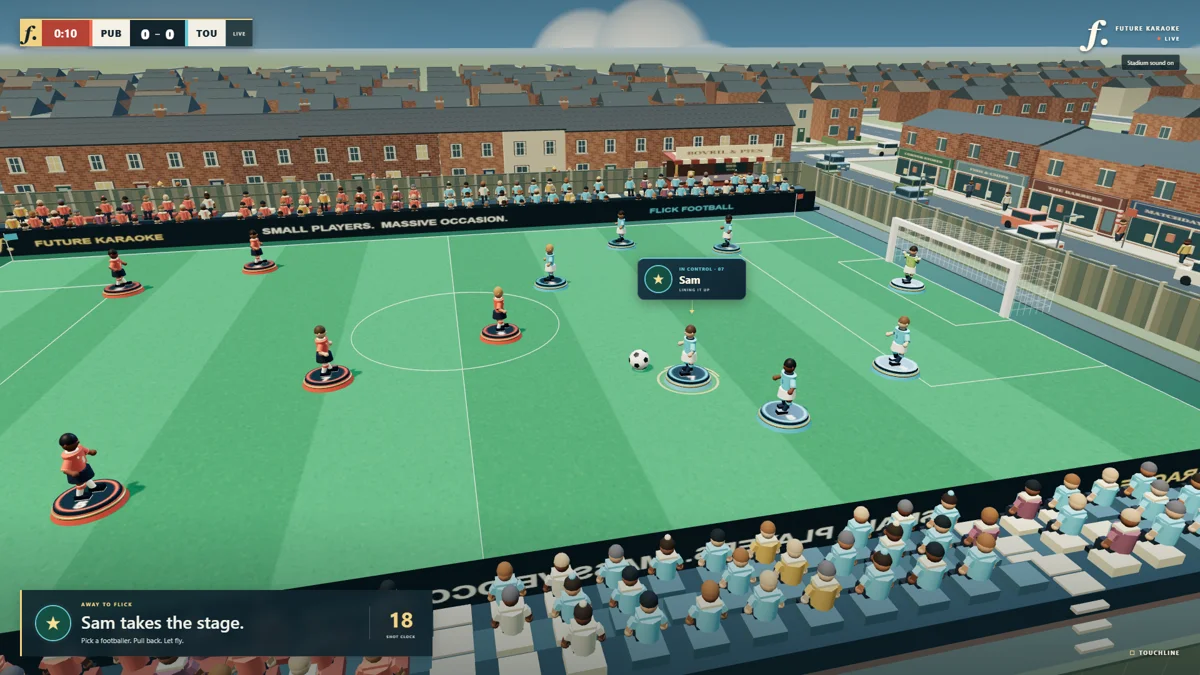
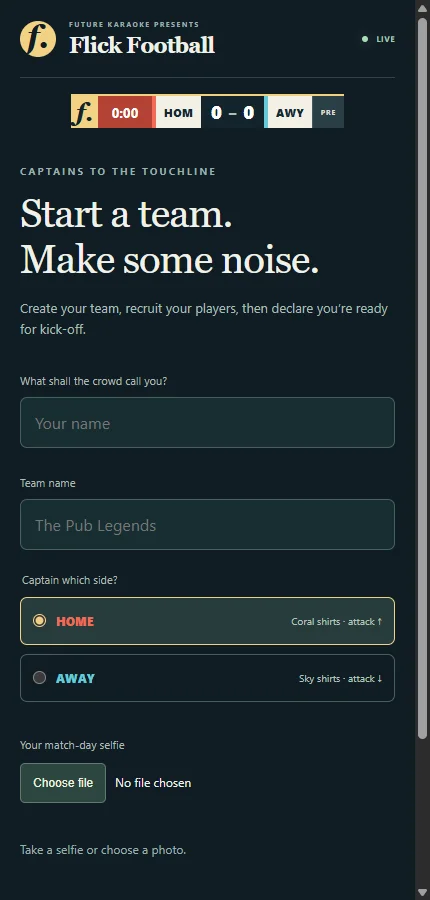
Your teams. Your tournament. Your moment of glory. Bring the audience together for a Subbuteo-style football tournament. Guests join teams and take turns playing from their phones, while the main screen follows the action with TV-style stadium coverage. Go head to head, cheer on your teammates and battle through the knockout draw to crown the room’s champions.
The action on your main screen.Join Flick Football from your phone.
All three games are free to play and currently in beta. Quiz Player hosts imported quiz packs for free; creating or editing packs in Quiz Hub requires a Future Karaoke licence. Install the karaoke app separately using the standard downloads above.
On a phone? Join in.
A little karaoke magic. Right in your browser.
Scan the QR code, request a song, hear the presenter call your name and press the big red button. Try the stage and Live Show controls before you install.
No download or account needed · One demo song · Around 20,000 songs in the full app
Install the softwareUse the Windows or Mac download above, then open Future Karaoke.
Start a trial or activate your licenceOn Windows and Mac, choose Start free trial and verify your email. If you have a subscription or existing trial key, enter it in Future Karaoke and choose Activate.
Connect your equipmentUse your own screen, microphones and sound system.
Get your night readyConnect to the internet and follow the user guide to set up your show.
Every subscription includes licensed karaoke tracks from Sunfly. You’ll need internet access for the subscription services.
Before your first karaoke night, try a song with your computer, screen, microphones and sound system connected.
Nerd information
Version numbers, installation notes, computer requirements and the finer details. All here when you need them.
Versions and installation help
The eight-hour pass requires version 1.3.4 build 13402 or later. The current direct downloads above are compatible.
Future Karaoke for Windows
The Store app uses its own settings and show data. Already using our website installer? Use the direct download below to update your existing installation.
Standard version 1.3.7 · Build 13701 · 150.7 MB · 64-bit Windows
Official release · 28 October 2026. Download and run this installer to update. Existing shows and settings are retained.
Windows may show a Microsoft SmartScreen warning because this installer is unsigned.
Open the downloaded file and follow the installation steps.
Future Karaoke for Mac
Standard version 1.3.7 · Build 13701 · 262.4 MB · macOS 12 or later
Official release · 28 October 2026. Signed and notarised for Intel and Apple silicon. Smoother phone updates; existing links and QR codes keep working.
Quit Future Karaoke, install the update, then check Welcome for v1.3.7 · Build 13701. Existing shows, saved content and settings are retained.
Open the downloaded file, then drag Future Karaoke Lite into Applications and replace your existing copy.
Phone requests and singer controls
Online songbook and Big Red Button
Included in the standard Windows and Mac downloads. Guests can request songs using their phone’s mobile data, without joining your venue Wi-Fi. Each computer has its own online songbook link from 1.3.2. If upgrading from 1.3.1 or earlier, turn Online mode on and use the new computer-specific link shown in Future Karaoke. Mac 1.3.6 creates new links at songbook.futurekaraoke.com. Existing online links and printed QR codes continue to work.
Online songbook: singer countdowns, artist browsing, On Now, queue management, singer alerts, show themes, closing messages and competition results. Live updates pause when the phone is hidden or offline; emojis are limited to one every ten seconds.
Let guests request using mobile data
Connect your karaoke computer to the internet. Use Ethernet, private venue Wi-Fi or a mobile hotspot. Guests don’t need access to that connection.
In Settings, choose Online in Guest Songbook. Wait for the connection to be ready, then display or share its QR code.
Guests scan the code and choose a song. The songbook opens in their phone’s browser. Their requests arrive in your Host’s queue.
Let singers start their own song
Under Singer Ready Trigger, enable Big Red Button on the singer’s phone. When the singer is called, their button appears on the phone they used to request the song.
After the introduction, they tap to start. To stop, they hold the button for three seconds. Letting go early cancels the stop.
This also works with Local Wi-Fi requests. Keep the requesting browser open on that phone to use its button.
You still need internet access. The licensed Host must stay running and connected. Guests need mobile coverage or another internet connection, and normal mobile-data charges may apply. Online mode removes the need to share a network; subscription services still need an internet connection.
Computer requirements
Which stage should I use?
Classic Stage is included
Classic Stage gives you song playback, automated voice hosting, phone requests, singer call-ups and staff controls. It is the lightweight HTML Stage, designed for compatible everyday Windows PCs and Macs, including older Intel laptops.
On Windows, use the x64 Host download. On Mac, you need macOS 12 or later; both Intel and Apple silicon are supported. An older Mac, such as a 2015 MacBook Air, needs a supported operating system.
Choose a built-in look or your own photos, video and slideshow backgrounds in Stage Appearance. Try your computer, screen, microphones and audio setup before a venue night.
Already installed? Updates and what’s changed
Older notes below are retained for reference. Unreal Stage development and downloads are paused; use Classic Stage for your show.
Download the latest installer to receive these updates. Windows 1.3.7 build 13701 and Mac 1.3.7 build 13701 are the official stable releases. Use the standard download for your computer at the top of this page.
On Windows, run the installer. On Mac, quit Future Karaoke and replace the app in Applications. Reopen Welcome and check the version and build shown beneath the logo. Your existing shows and settings are retained.
Windows 1.3.7 · Live phone updates · 28 October 2026
Build 13701. Online songbooks receive live queue and singer-control updates with fewer repeated background requests.
Private request confirmations and reconnect fallback keep song submissions reliable.
Local Wi-Fi queue updates avoid unnecessary ownership checks.
Existing QR links, shows, settings and licences are retained.
Classic Stage and native Windows microphone processing remain included. The direct Windows installer is unsigned. Mac remains on its independently verified release below.
Windows 1.3.6 · Branded songbooks and safer saves · 21 October 2026
Build 13601. New online songbook links and Stage QR codes use songbook.futurekaraoke.com, with the same room and session. Existing links and printed QR codes continue to work.
Guest connection errors are contained so one broken connection does not interrupt the Host or other singers.
Settings confirm success after saving to disk. If a save fails, a clear message explains how to retry while live controls stay active for the session.
Reaction choices stay under your finger when reduced motion is enabled. Staff Requests keeps the correct local connection.
The Stage QR caption now distinguishes Online requests from Local Wi-Fi.
Includes the refreshed phone songbook and audience reaction picker. Existing shows, settings and licences are retained. Classic Stage remains included; the direct Windows installer is unsigned.
Windows 1.3.5 · A refreshed phone songbook · 20 October 2026
Build 13501. The compact ON STAGE card puts the current singer and song above the songbook, with audience reactions a thumb away.
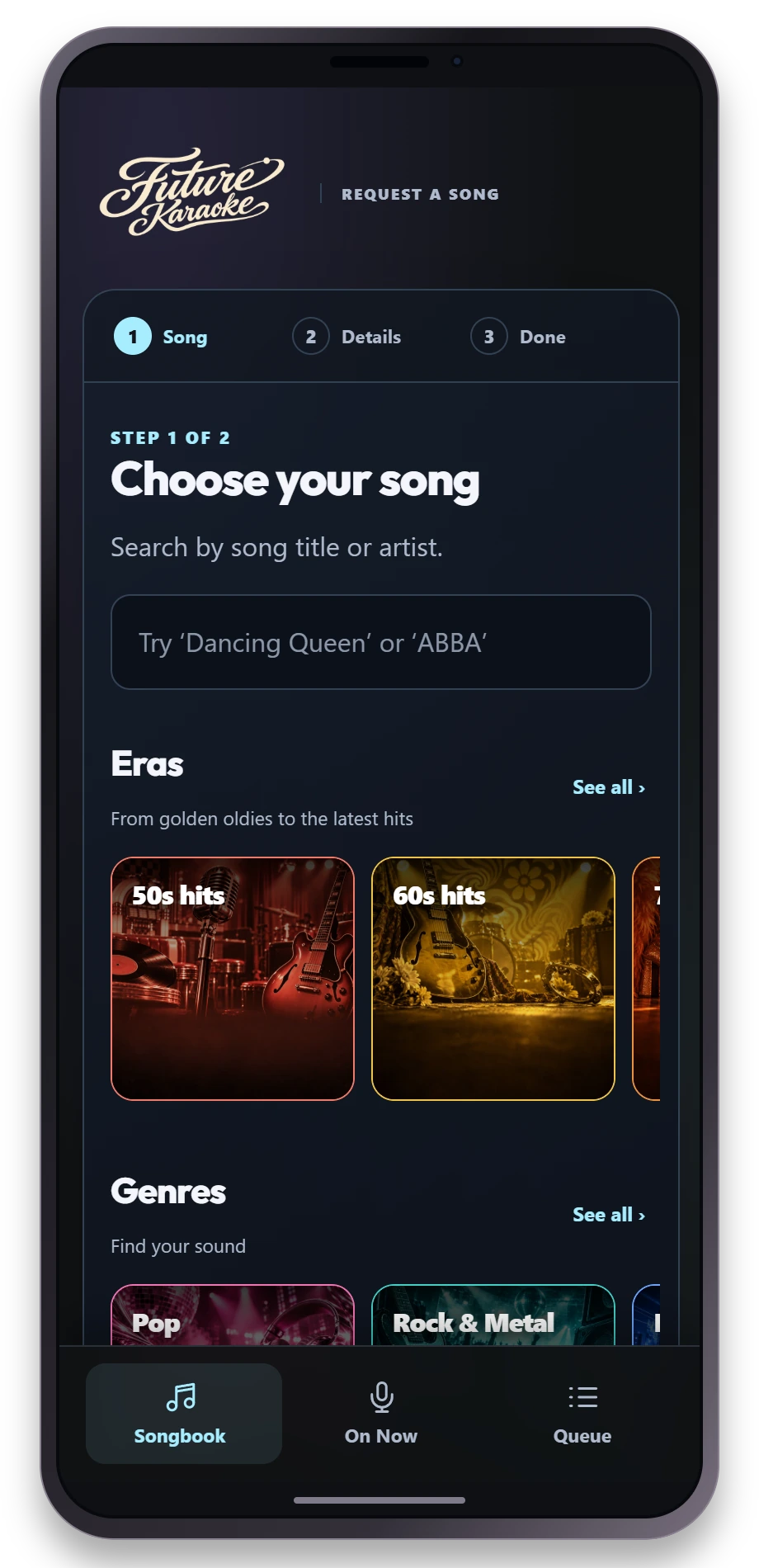
Browse eras, genres and sing-together collections in tighter tiles that make better use of your phone screen.
Tap the singing smile to choose a reaction, or hold, slide to an emoji and release to send. The ten-second reaction limit remains in place.
A gentle emoji pulse and slow moving card background respect your reduced-motion preference.
Wi-Fi reactions pause when the Host connection drops. The reaction picker supports keyboard focus, cancellation and singer changes.
The online songbook also receives this design without a desktop reinstall. Existing online links continue to work. Install Windows 1.3.5 for the updated local Wi-Fi songbook. Existing shows and settings are retained. The direct Windows installer is unsigned.
Windows 1.3.4 · Checkout recovery · 19 October 2026
Build 13403. Interrupted full-licence subscription and eight-hour pass checkouts now have a clearer recovery path. If a checkout is saved, the app shows Your previous checkout is saved so you can check that purchase before starting another.
Checking an existing checkout never creates a new purchase. A saved checkout stays available if a check fails or you reopen the app.
Use Recover an existing licence if you already have a licence. A new subscription or pass checkout is offered only after the service confirms the previous checkout expired or failed without payment, and you explicitly choose to start again.
Already using 1.3.4? Download and run the Windows installer manually to install v1.3.4 · Build 13403. The version number is unchanged, so the app will not offer this build as a newer version. Existing shows and settings are retained. The direct Windows installer is unsigned.
Windows 1.3.4 · Eight-hour passes and clearer access · 19 October 2026
Build 13402. Choose a free trial, an eight-hour pass or a full licence from the new Licence & access Welcome page. The app displays current Polar prices, with a clear retry message if pricing is unavailable.
Eight-hour passes provide Pro Venue access on one computer without a subscription. Time counts while Future Karaoke is open, including minimised time; choose Quit or Shutdown to save unused time. Internet is required.
Each pass includes 110,000 AI voice characters and 50,000 AI writing tokens for that purchase. Recover the same paid key on the same computer to resume its remaining time and credits.
Paste your subscription or pass key into one activation form. Welcome recognises valid access, and existing show settings and Windows audio controls are retained.
Download and run the Windows installer to update. Existing shows and settings are retained. Use Classic Stage and check your display, phone requests, microphones and sound before a venue night. The direct Windows installer is unsigned.
Mac 1.3.7 · Smoother phone updates · 28 October 2026
Build 13701. Quieter guest updates while keeping the night moving.
Fewer repeated phone ownership checks, with queue controls and stage alerts kept current.
Reliable reconnection and compatible online phone updates. Existing QR codes and links keep working.
The Stage QR caption now reflects Online or Local Wi-Fi joining.
Signed and notarised universal Mac app for Intel and Apple silicon, macOS 12 or later. Quit Future Karaoke, install the update and confirm v1.3.7 · Build 13701 in Welcome or the sidebar. Existing shows and settings are retained. Check phones, screen, microphones and sound before your venue night.
Mac 1.3.6 · Branded online songbooks · 20 October 2026
Build 13601. A cleaner address for guests joining your karaoke night.
New online songbook links and QR codes use songbook.futurekaraoke.com.
Existing online links and printed QR codes continue to work with the same computer and show.
Includes the refreshed phone songbook and guest connection reliability fixes from 1.3.5.
Keeps your existing shows, settings, subscriptions, playback and microphone controls.
Signed and notarised universal Mac app for Intel and Apple silicon, macOS 12 or later. Quit Future Karaoke, install the update and confirm v1.3.6 · Build 13601 in Welcome or the sidebar. Check your phone, screen, microphones and sound before your venue night.
Mac 1.3.5 · Guest connection reliability · 20 October 2026
Build 13502. A reliability update to Mac 1.3.5, keeping the refreshed phone songbook and existing karaoke controls.
Invalid guest connections now close safely while the Host and other guests keep working.
Invalid singer names and queue IDs receive a clear request error without interrupting the show.
Keeps your existing shows, settings, subscriptions, playback and microphone controls.
Already running 1.3.5? This is a new build of the same version, so the update checker will still say you are current. Download the refreshed installer manually, quit Future Karaoke and replace the app in Applications. Reopen it and confirm v1.3.5 · Build 13502 in Welcome or the sidebar. Signed and notarised universal app for Intel and Apple silicon, macOS 12 or later. Check your phone, screen, microphones and sound before your venue night.
Mac 1.3.5 · A refreshed phone songbook · 20 October 2026
Build 13501. See the current singer and song in a compact ON STAGE card above the songbook, with Songbook and Queue tabs below.
Browse eras, genres and sing-together collections in compact tiles that make better use of your phone screen.
Tap the singing smile to choose a reaction, or hold, slide to an emoji and release to send. The ten-second reaction limit remains in place.
Reactions pause when the Host connection drops and resume after fresh show state arrives. Keyboard focus, touch cancellation and reduced-motion preferences are supported.
Keeps the existing Mac playback, microphone controls, access options, eight-hour passes and checkout recovery.
The shared online songbook already carries the refreshed design. Install Mac 1.3.5 for the updated local Wi-Fi songbook. Quit Future Karaoke and replace the app in Applications. Existing shows and settings are retained. Signed and notarised universal app for Intel and Apple silicon, macOS 12 or later. Check your phone, screen, microphones and sound before your venue night.
Mac 1.3.4 · Checkout recovery fixed · 19 October 2026
Build 13403. An old, expired unpaid checkout no longer blocks a new purchase. The licence server verifies that it expired without an order before the app preserves the old receipt and lets you continue.
Paid, processing or unverified purchases stay saved for recovery. A connection problem will not discard them or start another checkout.
Keeps the clear access cards, automatic subscription and eight-hour pass key recognition, and current prices from Polar.
Eight-hour pass time counts while the app runs, including when minimised. Choose Quit to save unused time on that computer.
Already using 1.3.4? This refresh keeps the same version number. Download the new installer, quit Future Karaoke and replace the app in Applications to install v1.3.4 · Build 13403. Your existing shows and settings are retained.
Signed and notarised universal Mac app for Intel and Apple silicon, macOS 12 or later.
Mac 1.3.4 · Clearer access and current prices · 19 October 2026
Build 13402. Choose your access before the main Welcome page, with clear free trial, eight-hour pass and full licence cards. When valid access is active, Welcome opens directly; access choices return if it expires or is removed.
Paste your subscription or eight-hour pass key and the app recognises it automatically.
Pass and subscription cards show current Polar prices, including free offers. Secure checkout confirms the final total.
Existing pass keys recover their saved time after a price change. Time counts while the app runs, including when minimised; Quit saves unused time.
The eight-hour pass keeps its individual paid Sunfly venue key, with 110,000 AI voice characters and 50,000 AI text tokens per pass. Internet access is required.
Already using 1.3.4? This refresh keeps the same version number. Download the new installer, quit Future Karaoke and replace the app in Applications to install v1.3.4 · Build 13402. Your existing shows and settings are retained.
Signed and notarised universal Mac app for Intel and Apple silicon, macOS 12 or later.
Mac 1.3.4 · The £35 eight-hour pass · 19 October 2026
Build 13401. Buy eight hours of Future Karaoke without starting a subscription. Unused time is saved when you quit the app, ready for another session on the same computer.
Buy securely from Welcome or Settings → Licence in the updated Mac app. Confirmed payment activates your pass on that computer.
Time counts while the app is open, including when minimised. Quit Future Karaoke to pause the timer and save unused time.
Licensed Sunfly karaoke, automated hosting, Classic Stage and phone requests, with 110,000 AI voice characters and 50,000 AI text tokens per pass.
Existing subscriptions and the free 30-minute trial remain available. The paid pass requires internet access.
Signed and notarised universal Mac app for Intel and Apple silicon, macOS 12 or later. Quit Future Karaoke, replace the app in Applications and confirm v1.3.4 · Build 13401 on Welcome. Existing shows and settings are retained.
Mac 1.3.3 · Guided setup and smoother show flow · 15 October 2026
Build 13304. Smart flow is now on by default: background music continues through silent karaoke intros, then fades when the karaoke music starts. An existing saved Off choice is retained.
Choose quick setup or a guided Show Wizard, with optional conversational help, sound checks and automatic closing announcements. Setup replies and Undo stay with the show they belong to.
Quick settings brings singer wait, missed calls, queue behaviour, phone start controls and request filtering together. Changes report success after they are stored, with a clear error if saving fails.
Saved Calm and Hype presenter energy choices help set the tone. Theme Studio supports creating and managing Classic Stage looks, including fonts, images and video.
Use local or web background music with the show’s music controls. Pausing during preparation of the next local track now stays paused; unavailable or unplayable local tracks are skipped so one failed file does not stall the playlist.
Licence checks respect a newly activated or deactivated licence, and a missing protected licence session no longer leaves a stale active display. Includes Night Planner, announcements, in-app trials, device songbooks, catalogue refresh and error reporting improvements.
Signed and notarised universal Mac app for Intel and Apple silicon, macOS 12 or later. Classic Stage and built-in Mac microphone processing are included. Quit Future Karaoke, replace the app in Applications and confirm v1.3.3 · Build 13304 on Welcome or in the Control Room sidebar. Existing shows and settings are retained.
Windows 1.3.3 · Guided setup and smoother show flow · 15 October 2026
Build 13303. Smart flow is now on by default: background music continues through silent karaoke intros, then fades when the karaoke music starts. An existing saved Off choice is retained. Change it in Settings > Music Library.
The guided Show Wizard helps set up the night, with optional AI assistance and sound checks. Saved Calm and Hype presenter energy choices help set the tone.
Web and local background music share the show’s music controls. BGM can recover from an unavailable track, and presenter speech completion can recover after a temporary connection loss.
Theme Studio supports creating and managing Classic Stage looks. Includes native Windows microphone processing, the in-app trial, device songbooks and error reporting.
Download and run the Windows installer to update; existing shows and settings are retained. Check your screen, phone requests, microphones and sound before a venue night. The Windows installer is unsigned.
Windows 1.3.2 · Trials and device songbooks · 8 October 2026
Build 13201. Choose Start free trial on the Welcome screen, enter your name, email address and venue, accept the trial terms and verify your email. The 30-minute allowance counts down while the app is open, including when minimised. Quitting normally saves the unused allowance for your next session. Internet access is required and trial availability is managed by Future Karaoke.
Online songbooks use a separate link for each computer, so requests reach the correct Host when a venue uses more than one. After upgrading, turn Online mode on and refresh printed or saved QR codes using the new link shown in Future Karaoke. Version 1.3.1 and earlier keep their existing venue route. Read how device IDs are used and retained.
Choose Report error in the app menu to send a problem description and contact details to Future Karaoke support. Recent diagnostic logs are attached with recognised credentials redacted. This release retains the previous stability fixes, Classic Stage, built-in Windows microphone processing and vocal effects.
Download and run the Windows installer above to update; your existing shows and settings are retained. Check your display, phone requests, microphones and audio setup before a venue night.
Windows 1.3.1 · Official release · 7 October 2026
Build 13102. Includes online guest requests, singer last-call warnings, compact Quick settings and Classic Stage. This release fixes song preparation interrupted by new requests, preset loading during a singer Start, overlapping Saved Show writes, guest input handling, live phone theme changes and long Stage headlines.
Download and run the Windows installer above to update from 1.2.3 or the 1.3.1 beta. Your existing shows and settings are retained. Check your display, phone requests, microphones and audio setup before a venue night.
Windows 1.3.1 beta · Online songbook · 6 October 2026
The online songbook brings the singer countdown, artist browsing and device-owned queue controls to mobile-data guests. These features are now included in the official Windows 1.3.1 release; select Online in Guest Songbook. Emoji reactions use a ten-second limit; background and offline phones pause live updates.
Windows 1.3.0 beta · TTS fix · 3 October 2026
This revision fixed a licence refresh conflict that could leave presenter speech showing TTS offline while credit was still available. The revision kept version 1.3.0 and required a manual reinstall. The current Windows installer above is the official 1.3.4 release.
Mac 1.3.2 · Start a trial in the app · 8 October 2026
Build 13201. Choose Start free trial on the Welcome screen, enter your name, email address and venue, accept the trial terms and verify your email. The trial gives you 30 minutes while the app is open, with a countdown and a licence purchase prompt when time runs out. Internet access is required and trial availability is managed by Future Karaoke.
Online songbooks use a separate device link from 1.3.2 onward, so requests go to the correct computer even when a venue uses more than one Host. Existing 1.3.1 and earlier links keep their current venue route. After upgrading, turn Online mode on and refresh any printed or saved QR codes using the new link shown in Future Karaoke. We use a protected app-specific device identifier to associate your computer with its venue and keep requests separate. Read how device IDs are used and retained.
Includes Report error with attached diagnostic logs and the previous licence-entry, Classic Stage, online songbook and playback improvements. Quit Future Karaoke and replace the app in Applications. Your existing shows and settings are retained.
Mac 1.3.1 · Error reporting · 8 October 2026
Build 13103. Choose Report error in the app menu to send a description of a problem, your venue name, licence key and contact details to Future Karaoke support. Recent diagnostic logs are attached automatically, with recognised credentials redacted. Internet access is required.
Includes the previous Stage, online songbook, singer last-call and stability improvements, plus the latest licence-entry fixes. Quit Future Karaoke and replace the app in Applications. This refresh keeps version 1.3.1, so install it manually to receive build 13103. Your existing shows and settings are retained.
Mac 1.3.1 · Official release · 7 October 2026
Build 13102. The official stable Mac release includes the latest Stage and stability improvements, plus fixes to licence entry and the version display.
Licence entry keeps your text and cursor when background playback or show updates arrive, making typing and pasting a key reliable.
The version and build number sit at the bottom of the Control Room sidebar. Shipping builds also show the build number on Welcome.
Downloadable Classic Stage packs include previews and custom fonts, with installed themes available offline. Stage text fits more reliably without clipped custom fonts.
Native playback windows recover from a renderer interruption, restore the song position and paused state, and show a clear recovery or failure message. Interrupted presenter speech offers Replay.
Song preparation and Saved Shows have stronger safeguards against overlapping operations. Guest theme changes retain in-progress input, and singer requests can include a short presenter note.
Includes build 13101’s singer last-call countdown, online songbook and presenter improvements. Quit Future Karaoke and replace the app in Applications to install build 13102; existing shows and settings are retained. Use Classic Stage and check your display, phone requests and audio setup before a venue night.
Mac 1.3.1 · Singer last call and online songbook · 7 October 2026
Build 13101. These singer last-call, Classic Stage and online songbook improvements are included in the official Mac 1.3.1 release.
A singer last-call countdown, final-call message and moving-on announcement keep the queue moving when a singer does not come forward. Stage and phone prompts show the same deadline; the singer can still start their prepared song.
Classic Stage call-ups and the Big Red Button have clearer final-call and handover visuals, including compact phone landscape layouts and reduced-motion support.
Online songbook support includes artist browsing, On Now, device-owned queue changes, singer alerts, show themes, closing messages and competition results.
Presenter and show setup include gender-neutral announcements, singer wait settings and optional missed-request recall, with improvements to announcement preparation and Saved Shows.
Includes the previous Mac Sunfly sync, Welcome build label, online guest request and presenter speech fixes. Quit Future Karaoke, download the current Mac installer above and replace the app in Applications. Your existing shows and settings are retained. Use Classic Stage and test your display, phone requests and audio setup before a venue night.
Mac 1.3.0 beta · Sunfly sync and Welcome build · 5 October 2026
Build 13003. Sunfly catalogue completeness checks now account for support files correctly. After licence approval, the catalogue syncs automatically in the background while activation completes, with progress and a retry option. Existing songs remain available if a refresh fails. Welcome shows build 13003 directly beneath version 1.3.0. Includes the presenter speech and online guest request fixes from earlier beta builds. Quit Future Karaoke, download the current Mac installer above and replace the app in Applications. The version remains 1.3.0, so install this update manually; your existing shows and settings are retained.
Build 13002 — presenter speech fix. Fixes presenter speech unexpectedly going offline when several announcements were being prepared at once. Speech now stays available while the app renews its licence session. Existing 1.3.0 beta users must download and replace the app manually; the version number remains 1.3.0.
Build 13001 brings online guest requests to the Mac beta alongside Local Wi-Fi mode. Guests can scan the online QR code and request using mobile data. The called singer can use the requesting phone’s Big Red Button to start, or hold for three seconds to stop.
The Mac-served Big Red Button now animates while a song gets ready, with a clear “Getting ready” message and a reduced-motion alternative. Includes the latest Mac fixes and Classic Stage. These earlier improvements are included in the current stable Mac 1.3.1 download at the top of this page. Test your display and audio setup before a venue night.
Windows 1.2.3 · Sunfly sync fix · 5 October 2026
Windows build 12306 fixes a Sunfly catalogue sync failure that could keep licensed songs from appearing. After licence approval, the catalogue loads automatically in the background, with progress and a retry option. Existing songs stay listed if a refresh fails. The welcome screen now shows the build number directly beneath the version number.
This 5 October revision kept version 1.2.3 and required a manual download and reinstall, retaining existing shows and settings. The current Windows installer above is version 1.3.4 with Classic Stage. Unreal Stage downloads are paused.
Windows 1.2.3 · revised 1 October 2026
The 1 October revision added the guest songbook, Sunfly metadata and automatic genre-based microphone effects. It kept version 1.2.3 and required a manual reinstall. Windows Unreal Stage 1.2.3 was the separate Stage release at that time. The current Windows installer above is version 1.3.4 with Classic Stage.
Browse swipeable artwork shelves for eight eras, streamlined genres and separate Collections, with search at the top.
Hold a song, right-click or use the keyboard menu to find More by this artist. Long titles and artist names now fit without overlapping cards.
Available Sunfly genres and years are added through a one-time catalogue refresh, without downloading every video. Manual metadata corrections and deliberate clears survive syncing and restart.
Microphone FX use the primary genre first, then secondary genres when needed. The selected effect stays fixed during the performance, with operator overrides retained.
Built-in Windows microphone processing sends vocals through the main Windows output alongside your music, with Start/Stop and Song-only controls.
New Misty Jazz, Reggae Echo and 80s Chorus vocal effects, plus a live microphone status indicator and input meter.
Show Wizard and pre-flight checks recognise the saved Windows microphone route and selected input channel.
Karaoke video plays inside the Unreal Stage window, with native Sunfly playback on Windows.
The QR invitation slides away when a song starts and returns between songs.
Requested Sunfly tracks download in the background with both Classic (HTML) and Unreal Stage, with the called singer prioritised. Playback still needs an online licence check.
Stage Appearance switches between HTML and an installed Unreal Stage. Choose Neon or Media Stage, with an image, looping video or slideshow for Media Stage.
After karaoke, background music starts the next track in the playlist instead of returning to track one.
Classic Stage and the in-app BGM collection downloader remain included. Both Windows installers are unsigned; SmartScreen may warn.
Mac 1.2.3 · Welcome build number · 5 October 2026
Build 12306. Welcome now shows the installed app version and build number together, making it easy to check which release you are running. Includes the Sunfly sync fixes from build 12305: automatic catalogue sync after licence approval, progress and retry feedback, and existing songs retained if a refresh fails. Quit Future Karaoke, download the Mac installer above and replace the app in Applications. The version remains 1.2.3, so this update requires a manual download. Your existing shows and settings are retained.
Mac 1.2.3 · Sunfly sync fix · 5 October 2026
Build 12305. Fixes a Sunfly catalogue sync failure that could keep licensed songs from appearing. After licence approval, the catalogue syncs automatically, with progress and a retry option; existing songs stay available if a refresh fails. Quit Future Karaoke, download the Mac installer above and replace the app in Applications. The version remains 1.2.3, so this fix requires a manual download. Your existing shows and settings are retained.
macOS 1.2.3 · refreshed 30 September 2026
Install the revised Mac Host above, including if you already have version 1.2.3. The version number remains 1.2.3, so this refresh requires a manual download. Your existing shows and settings are retained. Mac Unreal Stage 1.0.1 remains current.
A redesigned guest songbook keeps search at the top, with swipeable image carousels for eras, streamlined genres and collections below.
Long-press a song, or right-click on desktop, to find more by the same artist. Song cards expand to keep long titles and artist names readable.
Browse 50s hits through to Latest Hits (2020 onwards). Older songs remain available through search.
A new header microphone indicator shows ON, MUTED or OFF with a live segmented VU meter. Click it to open microphone controls.
Microphone FX preserve vocal presence with balanced parallel compression, without changing your output fader.
Three new vocal presets: Misty Jazz for long, silky reverb; Reggae Echo for warm repeating echoes; and 80s Chorus for gently moving vocal doubles.
New presets work with saved show defaults, configured genre rules and performance overrides, while retaining Mac microphone and protection controls.
Requested Sunfly tracks prepare in the background, prioritising the called singer, to reduce the wait before playback.
After karaoke, background music continues with the next track in the playlist, preserving Back and Shuffle controls.
Stage Appearance switches between HTML and an installed Unreal Stage, with saved Neon or Media Stage choices and slideshow timing.
Mac Unreal Stage 1.0.1 slides the QR invitation away during songs, keeps it hidden while paused and brings it back between songs.
Media Stage images and videos stay upright. Wall videos are silent; videos and slideshows pause during karaoke, resume afterward and clear reliably.
Karaoke video stays inside the Mac Stage window using the existing Mac player. Native Edit-menu copy and paste remains available.
Signed, notarised universal Host for Intel and Apple silicon Macs; the optional Mac Unreal Stage is a separate Apple silicon download.
Other download formats and technical file details
Most people can use the Windows or Mac buttons at the top. Alternative Mac ZIP files and SHA-256 checksums are available here.
Windows standard version 1.3.7
28 October 2026 · Windows x64 installer · Build 13701 · 150.7 MB. Live phone updates, reliable request confirmations and less repeated traffic. Classic Stage and native Windows microphone processing included. Unsigned.
28 October 2026 · Universal DMG · 262.4 MB · Build 13701. Smoother phone updates; existing links and QR codes keep working. Intel and Apple silicon · macOS 12 or later · signed and notarised · Classic Stage included.



 Hub for Windows